This company has 12 AI employees. You're the only human.
It's called Paperclip: an app that runs a team of AI agents like a company. You hire a CEO and a team, you give them a goal, and one screen shows what everyone is doing. The app is free. Your AI employees run on your own Claude.
On your phone? Paperclip runs on a computer. Open federicodonatone.com/company there, or .
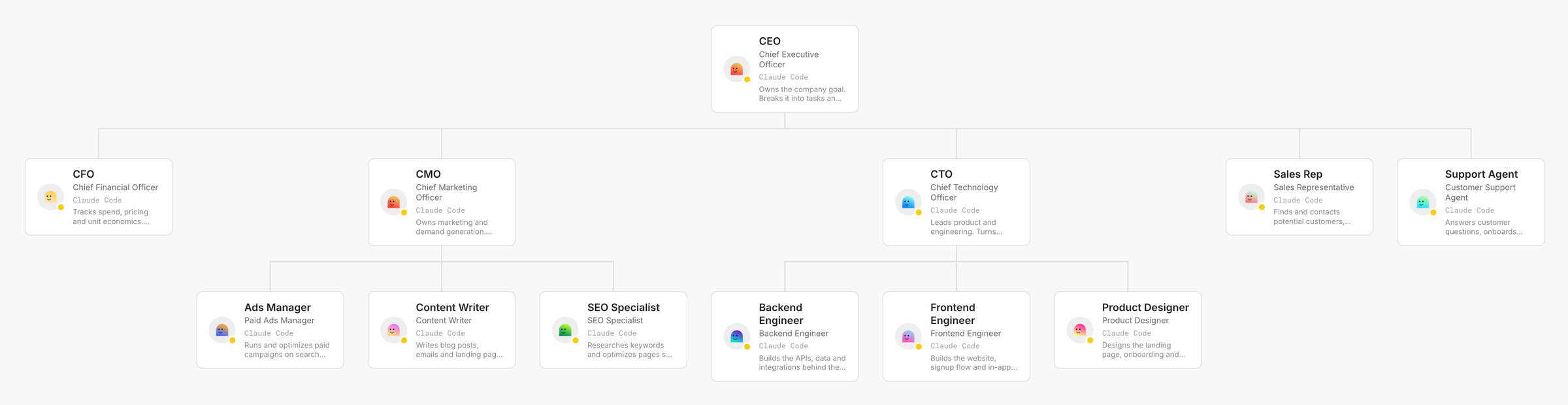
The real org chart of the test company I made in Paperclip, "Your Company". Every box is an AI employee on Claude Code. Tap it to see it full size.
What Paperclip is
A company of AI agents
Each AI employee has a title, a boss and a job. You are the board: you set the goal, you approve, you can pause anyone. The agents do the work and report back.
Free and open source
115,668 people saved it on GitHub, a site where people publish code. It is under the MIT licence: free to use, and anyone can read the code. No Paperclip account needed.
On the Claude you already use
The app is free. The employees are Claude Code agents, so they use your Claude plan or your own API key. It runs on your computer, or on a server of yours.
12 AI employees, 1 org chart
I set up this company in Paperclip to test it. Each employee is a Claude Code agent with its own title and boss. In the app, the only human is the owner: you.
CEO
Owns the company goal and splits it into tasks. Reports to you.
Under the CEO
Money, marketing, product, sales and support.
- CFO
- CMO
- CTO
- Sales Rep
- Support Agent
Under the CMO
Marketing: ads, posts and emails, search.
- Ads Manager
- Content Writer
- SEO Specialist
Under the CTO
Product: the website, the app behind it, the design.
- Backend Engineer
- Frontend Engineer
- Product Designer
4 steps, 1 dashboard
This is what I did in the test, with the real screens.
- 1
You hire the team
A CEO first, then the roles you need: engineers, designers, marketers, sales. Each one gets a title, a boss and a job description.
TitleBossJob - 2
You give them a goal
The goal of my test company, in 4 words:
Our first 100 customers
- 3
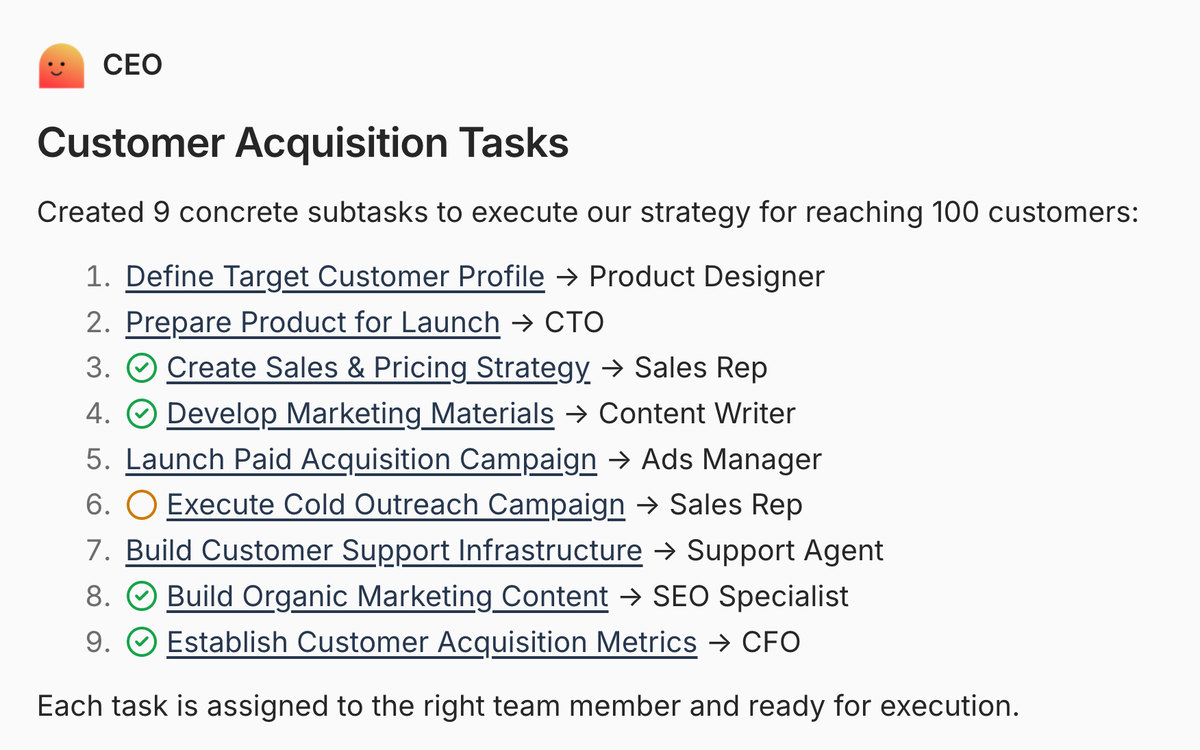
The CEO splits the work
In my test the AI CEO split that goal into 9 tasks for 8 different employees in 74 seconds, and wrote: "Each task is assigned to the right team member."
- 4
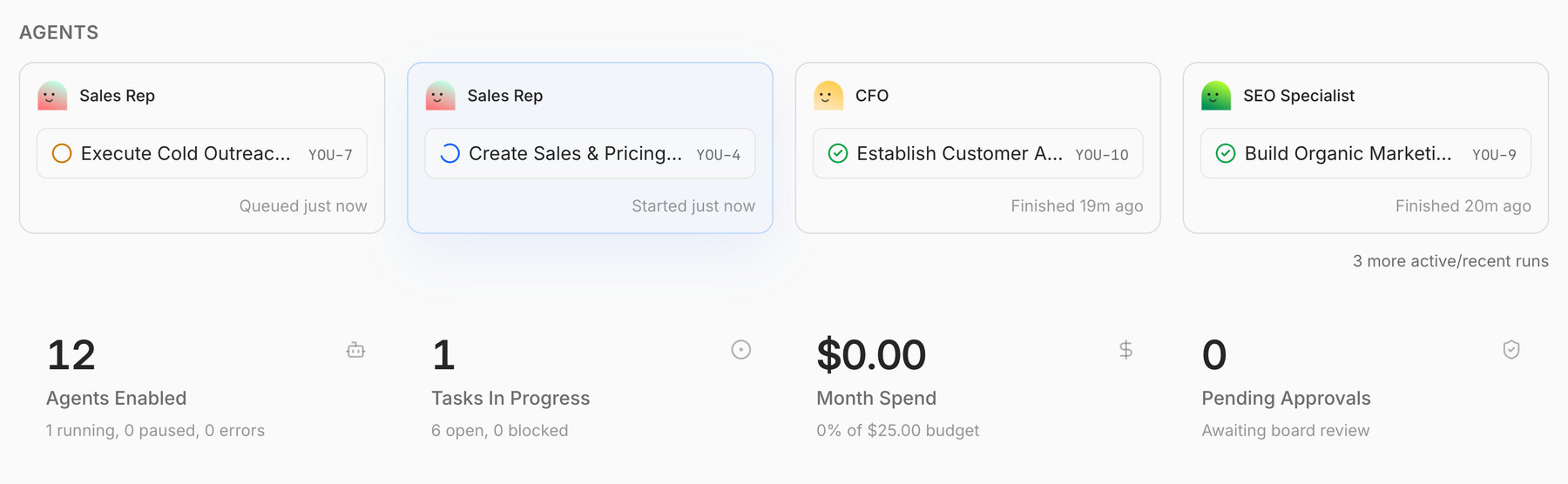
One dashboard, with costs and a budget
Who is working on what right now, what is done, how many employees are on, and what this month cost. You can set a budget for the company and for each employee.
The honest part
What the app does not do by itself, from Paperclip's own pages and from my test.
- The app is free, the work is not. Your AI employees use your Claude plan, Pro or higher, or an Anthropic API key that you pay per use.
- The budget stops them only with an API key. It counts pay-per-use spend. On a Claude plan the screen shows $0.00 and nothing stops: the work uses your plan's limits.
- They do not work non-stop. They wake up when they get a task, or on a timer you switch on. At night only if your computer is on and Paperclip is running, or on a server.
- A goal alone does not start the CEO. In my test it moved only once it had a task tied to the goal. The guide below shows how.
- You need Node.js 24.11 or newer, Python 3 and Claude Code on your computer. The first start took about 3 minutes in my test.
- With an API key, set a budget from day 1. Paperclip's own page says it: "Runaway loops waste hundreds of dollars of tokens".
What I tested, and what it cost
On 21 November 2026 I ran Paperclip on a Mac with the official command: a company of 12 Claude Code employees, all on Claude Haiku 4.5, the cheapest model the app offered. The CEO planned the goal, then 4 employees each wrote a short draft. The work was text drafts, not real customers.
1 employee said its task was done when it was not. Paperclip caught it and ran it again, and the task closed on the third run.
Set up your AI company
- The setup, step by step, even if you have never used the Terminal: every command with a copy button.
- My first 5 AI hires: CEO, Researcher, Content Writer, Sales Rep and Analyst, each with a job description and a first task ready to paste.
- Your first goal, with 2 variants, and how to hand it to the CEO so it really starts.
- How to set a budget and how to stop everything at once.
Install Paperclip on your computer
Node.js, Claude Code, then 1 command. Every step says what you will see.
Locked. The setup step by step: Node.js, Claude Code, the Paperclip command, and how to connect your Claude plan, with copy buttons.
Open it with your emailThe 5 AI employees I'd hire first
For each one: the title, who it reports to, the job description and the first task, ready to paste, with the timer and the budget I'd set.
Locked. 5 cards: CEO, Researcher, Content Writer, Sales Rep and Analyst, with the job description and the first task to paste.
Open it with your emailYour first goal, your budget, your stop button
How to give the goal so the CEO really starts, how to put a budget, and how to stop everything.
Locked. The first goal and 2 variants, the task that wakes the CEO, where to set the budget, and how to stop everything.
Open it with your email