JARVIS My setup guide. And what it can really touch.
JARVIS is a voice assistant with an Iron Man interface that runs on your computer. Say “Hey Jarvis” and ask: it answers out loud and uses your tools. The brain is Claude Code, on your own plan. Here is the sentence that sets it up, the manual route, how to connect your tools and exactly what it can reach.
Locked. The fast way to set up JARVIS opens with your email.
The code is free and open source (MIT). What you ask it runs on your Claude plan. Checked on 13 Oct 2026 against the repo at commit 1c4016a. Made by adewaskar. This page is my setup guide.
On your phone? JARVIS runs on a computer. Open federicodonatone.com/jarvis there, or .

A voice assistant with Claude Code as its brain
JARVIS is two programs on your computer. The face is a web page (React and Three.js) that listens, talks and draws the Iron Man interface. The brain is a small Node program, the bridge, that runs Claude Code headless through the Claude Agent SDK and hands it the MCP servers in your Claude Code config. So it can use your tools, by voice.
Who made it. JARVIS is an open source project by adewaskar, MIT licence, at github.com/adewaskar/jarvis (469 stars and 203 forks on 13 Oct 2026). I didn't write it: the guide is mine, checked against its README and its code.
Four things, one optional
-
1
Claude Code, installed and logged in
The only account JARVIS needs. Check it in Terminal. Missing? Install it from the official docs and run
claudeonce to log in.claude --version -
2
Node.js 20 or newer
Free, one installer from nodejs.org. JARVIS is a Node web app. Check your version:
node -vv20 or higher -
3
Chrome or Edge, in a real window
Preview panes inside an editor or inside Claude Code block the microphone: JARVIS looks alive and never hears you. Open it in a normal browser window. It also needs WebGL, which both browsers have.
-
+
Optional: an ElevenLabs key
A better voice and sharper transcription. ElevenLabs has a free tier. Without a key, JARVIS uses the browser's own voice and speech recognition, and everything still works. To add one, set
ELEVENLABS_API_KEYin the Terminal before you start JARVIS, or put it in theelevenlabsMCP server in~/.claude.json: the bridge reads it from there too.
After the clone, npm run setup checks all of this for you in plain language. It changes nothing.
Talk to Claude Code like Iron Man
- One sentence that sets JARVIS up for you, or the five commands.
- Your tools by voice: how to connect them, in three steps.
- Five fixes for when it doesn't hear you or doesn't draw.
One sentence, or five commands
Both routes end in the same place: JARVIS in a folder called jarvis, started with npm start, open in Chrome at localhost:5173.
Locked. The one sentence that sets JARVIS up for you, and the five commands, open with your email.
Open it with your emailSay “Hey Jarvis”, then just ask
Click INITIALISE: a short Iron Man boot sequence plays and the arc reactor lights up. Say “Hey Jarvis” or press Space, then ask. Here is a real exchange from the recording.
Hey Jarvis, what's on my calendar today?
Four items, sir. Standup at half nine, Northwind at eleven, product review at two, and the gym at half four.
The question was played into a virtual microphone; from there everything ran for real: wake word, transcription, Claude, the calendar tool, the voice. The calendar is a tiny test server with made-up events, added the same way you add your own tools (next section). It only has a tool that lists events, so it works in read-only mode. His voice in the recording is the ElevenLabs one (George, the default in the code); without a key you hear your browser's voice.
Keys and phrases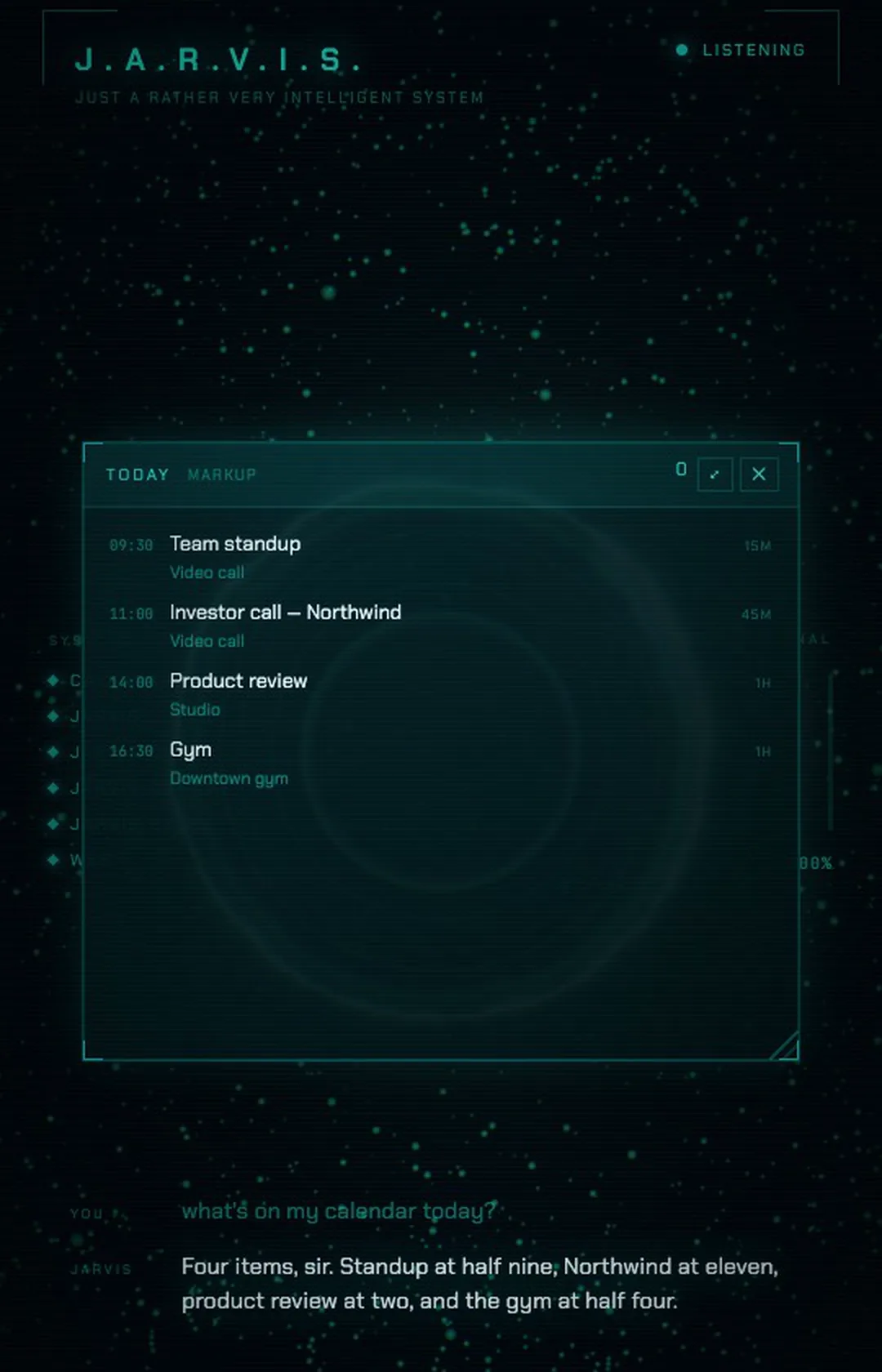
Your tools, by voice
Apart from your Chrome and your camera, JARVIS doesn't ship its own integrations. When the bridge starts, it reads the MCP servers in your Claude Code config file, ~/.claude.json, and hands them to Claude Code. Whatever servers you have there, JARVIS can use.
Locked. How to give JARVIS your tools, in three steps, opens with your email.
Open it with your emailFree code, your Claude plan
The README and the code disagree on one setting. The README says the default effort is medium. In the code at commit 1c4016a it's high, on claude-opus-5. More thinking per request uses more of your plan. To set it yourself, start JARVIS like this:
JARVIS_EFFORT=medium npm startJARVIS_MODEL picks the model the same way. The recording ran at low, which the code suggests when filming.
“Look at anything”: what that means
“Off by default, so JARVIS can look at anything and change nothing.”
.env.example in the JARVIS repo, about JARVIS_ALLOW_WRITESThe code keeps that promise: a gate called decideTool in bridge/server.mjs refuses anything that writes, sends, deletes, installs or pays. But “anything” is a lot. In the default mode JARVIS can:
- Read files on your computer and search and open web pages.
- Open and read pages in your own Chrome, signed in as you, if the Claude for Chrome extension is installed and Chrome is open. The bridge talks to the extension directly (
bridge/chrome.mjs). Mail, dashboards, anything you're logged into: it can open it, read it and take a screenshot. - Use the reading tools of every MCP server in your Claude Code config.
- Turn on your camera and look, after your browser's own permission prompt. The camera light stays on while it watches.
Turning writes on
Start it this way and JARVIS can also run shell commands, edit files, click and type in your Chrome, and use the tools that send, delete, install or pay. Voice has no confirm button: the gate decides ahead of time.
npm start -- --writesIt runs with your Claude Code login. The bridge loads none of your Claude Code settings files, so your allow rules and any bypass mode don't apply: its own gate is the only authority.
One nuance the author writes in the code: Claude Code can approve some harmless commands by itself before the gate is asked (the example in the comment is an echo). A refusal from the gate is reliable.
While it runs, your Wi-Fi can reach it. The bridge listens on port 8787 without limiting itself to your own computer (in the code, server.listen(PORT) gives no address). Other websites in your browser are turned away, but a program on the same network can skip that check: it could ask the bridge for any image in your home folder whose path it knows, or talk to JARVIS. At home that's a small risk. On shared or public Wi-Fi, turn on the macOS firewall (System Settings, Network, Firewall) or stop JARVIS with Ctrl-C when you're done.
Before you turn on writes, read decideTool() in bridge/server.mjs. It's short. As the README puts it, “Hey Jarvis, clean up my downloads folder” means something rather different with writes enabled.
Five fixes, from the README and the code
Locked. Five fixes, for when it doesn't hear you or doesn't draw, open with your email.
Open it with your email