Your TV shows you ads. This free AI turns them off.
CleanYourTV is a free project anyone can use. You paste one prompt into Claude Code with your TV model. It finds the TV on your Wi-Fi, asks which apps you use, and switches off the junk: ad services, tracking, sponsored rows, preloaded apps. Then it puts in a clean home screen, like an Apple TV. Nothing gets deleted. One line puts it all back.
For Android TV and Google TV. The ads inside YouTube or Netflix stay. Samsung or LG? The guide shows what to switch off with your remote.
Made by Gathin (@gathint) and the people who sent their TV lists. Free and open source. I'm not the author: I read the project and ran it on the official Google TV emulator.
On your phone? You need a computer on the same Wi-Fi as your TV. Open federicodonatone.com/tv there, or .
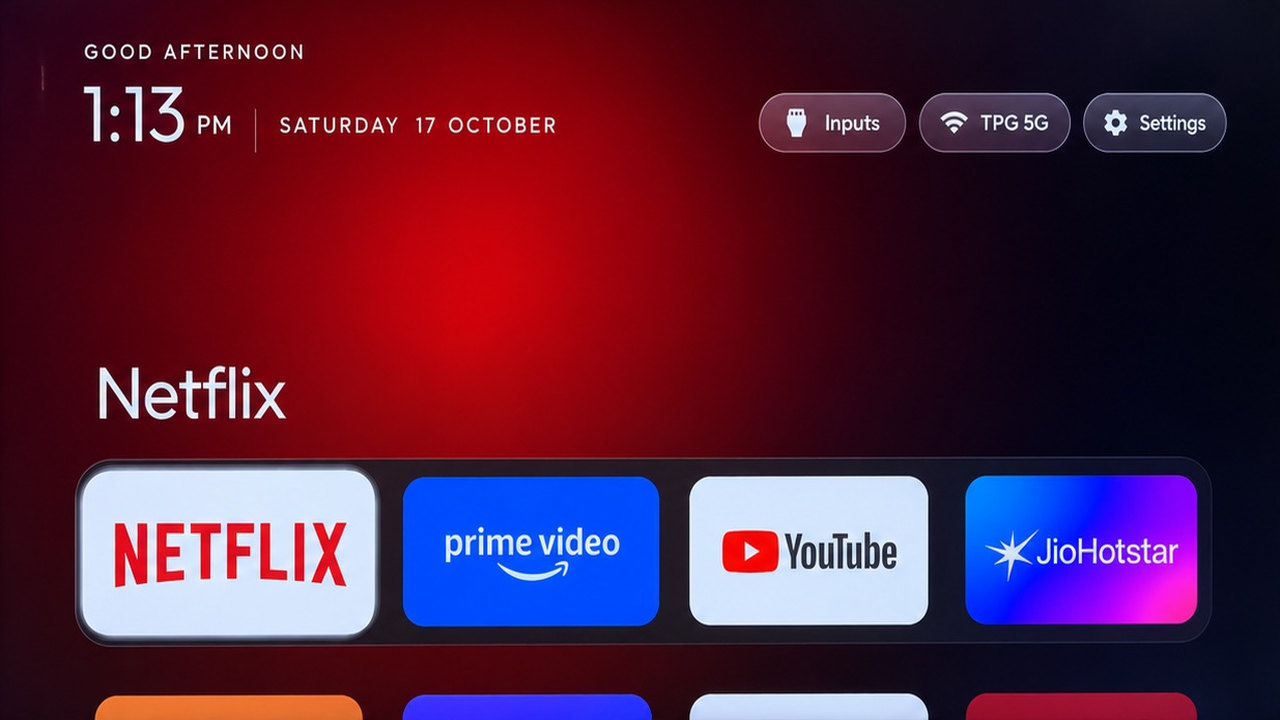
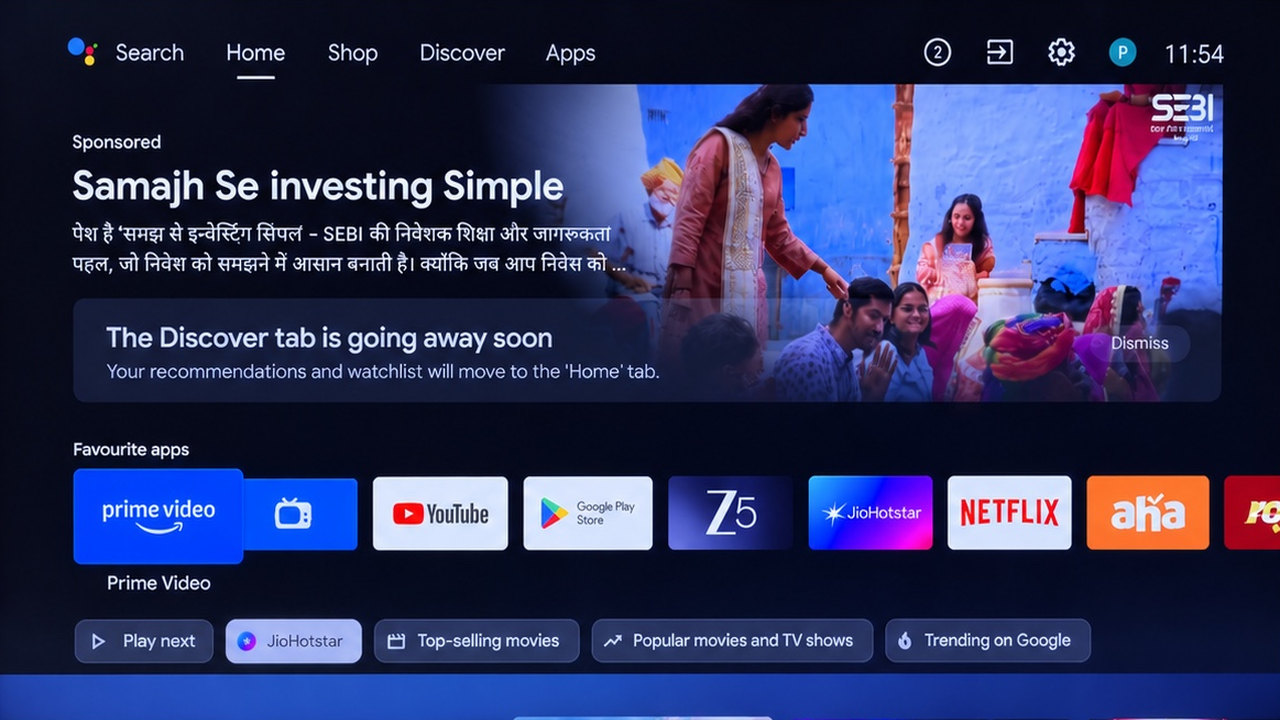
Photos from the CleanYourTV repo: a Redmi TV with Google TV, cleaned by Claude Code on 17 Oct 2026.
One prompt. The same TV, without the ads.
This is the TV of Gathin's post. Before, a sponsored ad sat on top of the home screen, above Netflix. He gave Claude Code the model number. In his words, Claude found the TV on the Wi-Fi, “removed 25 Xiaomi packages and wrote a new launcher”.
A sponsored ad at the top, then rows of apps, tabs and suggestions picked for you.
Four apps in a dock, a clock and the date. The rest of the apps sit one press below.
The post that started it: his parents' TV, cleaned by Claude Code in one afternoon.
Gathin (@gathint) on X · 17 Oct 2026 · 35,896 likes
Then I ran it myself.
The same new home, installed by Claude Code on a Google TV on 2 Nov 2026. My test TV was the official Google TV emulator on my Mac, with Android 14. What it switched off, how long it took and what did not work are in the guide.
It asks first. Then it switches off the junk.
Android TVs have a debug mode, like Android phones. You switch it on, allow your computer once, and Claude Code does the rest over your Wi-Fi. It runs on your computer and checks every step with a screenshot from the TV.
1. Back up
It saves the list of apps and settings on your TV before it changes anything.
2. Switch off
The maker's tracking, the ad services, the sponsored rows and the junk apps. Switched off in small batches. Never uninstalled.
3. New home
A small home screen like an Apple TV's: your apps in a dock, a clock, no ads. About 572 KB.
It switches off
- ✕ Ad services The parts that serve and target ads.
- ✕ Tracking and analytics What the maker collects about your TV and your viewing.
- ✕ Sponsored and suggested rows The content rows on the home screen.
- ✕ Preloaded junk apps The ones the TV came with that you never opened.
- ✕ The old home screen Only once the new one works.
It keeps
- ✓ Your streaming apps It asks which ones you use and keeps them.
- ✓ Play Store and your app updates
- ✓ HDMI, Live TV and the tuner
- ✓ The remote, Bluetooth, the keyboard
- ✓ Firmware updates Most lists leave them on.
- ✓ Chromecast and the voice assistant If you tick them.
It never touches the parts Android needs to start, and it asks before your apps, the voice assistant, Chromecast and the updates. On a TV nobody listed yet, it looks at what is installed and finds the junk by itself.
Android TV or Google TV? Yes.
416 TV models from 106 brands, each with a list shared by an owner who ran it. Your model is not there? The prompt finds the junk on your TV by itself.
YesAndroid TV and Google TV: the cleanup and the new home.
- TCL81
- Sony46
- Xiaomi41
- Philips22
- Skyworth15
- Hisense14
- SHARP10
- Panasonic7
- BenQ6
- Haier6
- JVC6
- Acer4
- OnePlus4
- Thomson4
- Toshiba4
- Google3
- Grundig3
- Motorola3
- +88 more brands
Your exact model? The guide links the project's search, model by model.
HalfFire TV: the cleanup only.
Fire OS keeps its own home screen, so the new home can't go in. A few China-market TCL sets refuse the new home too.
NoSamsung, LG, Roku, Vizio, Hisense VIDAA.
They don't run Android, so it can't run there. For Samsung and LG, my guide shows what to switch off with your remote. The tracking stops. The ads stay.
412 articles. Not all of them cheer.
One post on 17 Oct 2026. A week later, the #1 trending project on GitHub, the site where developers share code. By 30 October, the project counted 412 articles and 229 videos. Four headlines, and two that say be careful.
- TechCrunch · 19 Oct 2026People are using AI to make their smart TVs dumb again
- The Verge · 23 Oct 2026People are fixing their TV OSes with Claude
- Tom's Guide · 20 Oct 2026People are using AI to turn their smart TVs into dumb TVs
- Gizmodo · 20 Oct 2026People Using AI to Make Smart TVs Dumb Again Is the Most 2026 Thing Ever
- PCWorld · 22 Oct 2026 · be carefulPlease don't use AI hacks to debloat your TV
Says these hacks are complex and risky, with scripts nobody vetted. Its advice: the tracking switches in the TV's own settings, or a launcher from the Play Store.
- PCMag · 24 Oct 2026 · be carefulYou Don't Need AI to Dumb Down Your Smart TV. Do This Instead
About 15 minutes. The tool is free.
MIT licence. No app to buy, no account to make, nothing to pay.
Claude Code needs a Claude plan (Pro, Max or higher) or API credits. The free Claude plan doesn't include it. The project also names Codex, Gemini CLI and Antigravity CLI: each has its own plans and limits. I tested only Claude Code.
The project's own estimate with a coding assistant. Do it in one sitting: the TV stays in debug mode until the end.
What you need: a computer (Mac, Windows or Linux) on the same Wi-Fi as the TV, and your remote. The new home is built on your computer, so it also needs Python, Java and the Android tools: the guide has the lines, and Claude can run them for you. My own run, minutes and cost, is in the guide.
What it does not do, and the risks
- It doesn't remove the ads inside apps. YouTube, Netflix and the others keep theirs. An optional ad-blocking DNS stops some app ads, never YouTube's.
- Only Android TV and Google TV. Fire TV gets the cleanup only. Samsung, LG, Roku, Vizio and Hisense VIDAA: no.
- It needs debug mode on the TV. One “allow this computer” tap. Left open, that port is a way into the TV, and on some sets any device on your Wi-Fi can use it. So you close it at the end: the guide shows how, and how to check.
- Nothing is deleted. Things can still break. The risk is switching off something the TV leans on. So it works in small batches, after a backup, with an undo ready. The TV's own Settings menu can switch apps back on too.
- Some TVs got stuck. A Haier set restarted in a loop, and a Mi TV Stick never started again. The prompt now tells the AI to leave those parts alone, and the project's script refuses the list that broke the stick. TechCrunch reported one person who bricked an Android TV with Claude. If a TV stops starting, a factory reset is usually the way back, and it wipes your apps and accounts.
- The press is split. TechCrunch, The Verge and Tom's Guide wrote it up. PCWorld says don't: it calls these hacks complex and risky, with scripts nobody vetted. Its advice is to switch off the tracking in the TV's settings, or to install a launcher from the Play Store. My guide has those switches too.
- Updates can bring the junk back. A firmware update installs over the cleanup. One line checks what returned and switches it off again.
- Your warranty. The project's own legal note: changing a TV's software may affect its warranty or support. It runs on a TV you own, at your own risk.
- What I tested. One Google TV: the official emulator on my Mac, with Android 14, on 2 Nov 2026. It had no ads to begin with, because it had no Google account. The ads in the photos are on Gathin's TV. The Samsung and LG switches come from the project's own page: I did not test them.
Get the link and my setup guide
- The link to CleanYourTV, with a copy button. Free, MIT.
- The setup, step by step: debug mode on the TV, the folder on your computer, the prompt with your TV model. Every line with a copy button.
- Its questions, answered, and how to check it worked.
- How to undo it, and how to close debug mode at the end.
- Samsung and LG: what to switch off with your remote, year by year.
- My test: what it switched off, how long it took, the screenshots.
Clean your TV with Claude Code
Debug mode on the TV. One folder on your computer. One prompt with your TV model. Then you answer its questions.
Locked. The link, what you need, the clicks on the TV, the three lines for your computer, the prompt with your model and the answers to its questions.
Open it with your emailClose debug mode. Undo anything.
The step that is easy to forget, the one line that puts everything back, and what to do after a firmware update.
Locked. How to close debug mode and check it, the undo line, and the fix after a firmware update.
Open it with your emailNo Android? Switch off the tracking.
This tool can't run on them. Your remote can still stop the TV reporting what you watch. The ads stay, but they stop being aimed at you.
Locked. Every switch for Samsung and LG, with the menu path for each year of TV.
Open it with your emailI ran it on the Google TV emulator
Claude Code, the project's prompt, the official Google TV emulator. What it switched off, how long it took, and what did not work.
Locked. The minutes, the cost, the 8 apps it switched off, the screenshots and what did not work.
Open it with your email